


VectorMotion - Design/Animate
3.2108.00 Reviews
App Specs
- Version
- 1.2.7
- Updated On
- License
- Free
- Downloads
- 100,000+
- Developer
- ReMotion Apps
- Categories
- Art & Design
- Platform
- Android
Screenshots
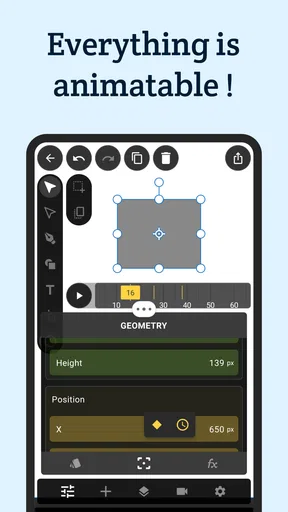
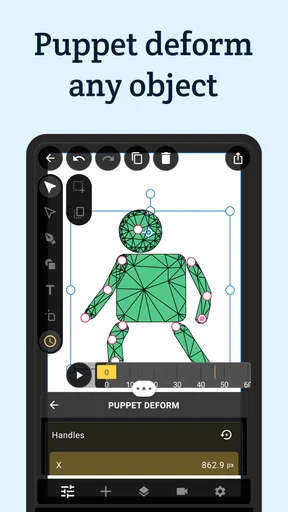
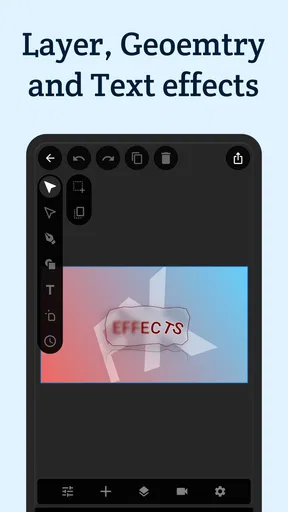
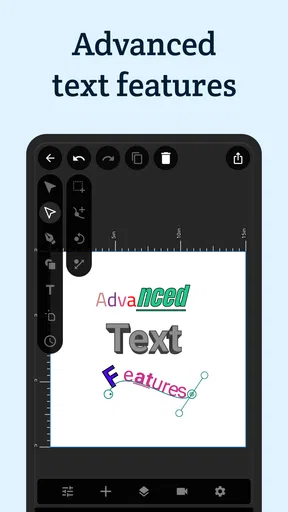
 Analysis by AppCompare
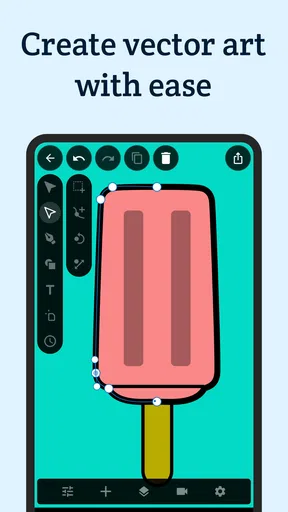
I approached VectorMotion - Design/Animate as a practical mobile design tool rather than a miniature replacement for every desktop creative application. Its promise is broad: one place for vector work and animation, aimed at people who want to create, adjust, and present visual ideas from a phone or tablet. After spending time with it, my impression is that its biggest appeal is convenience. It gives a designer a way to keep moving when a computer is unavailable, while also making simple animated concepts feel less intimidating than a full desktop workflow.
The app sits in the Art & Design category and is made by ReMotion Apps. It is free to use, rated for Everyone, and supports devices running Android 6.0 or later. Its current release is 1.2.7, and the project has reached over one hundred thousand installs with an average rating of 3.2 from around one thousand ratings. Those figures suggest a useful but uneven experience: enough people have tried it to establish a real audience, yet the rating also tells me that expectations should remain realistic.
How VectorMotion feels when the network becomes part of the workflow
I treat network access as part of the workflow rather than a background detail: a connection can affect how smoothly I get from opening a project to preparing it for someone else. For a quick concept, I keep the task small and check that the work is intact before moving on. That practical habit leads naturally to the bigger question of what a useful handoff looks like when a mobile draft needs to leave the app.
Connectivity matters most before the creative work begins
With an app like this, the first question is not only what can be drawn or animated, but how smoothly the surrounding experience behaves when the connection is unreliable. Opening a design tool on a phone often happens in imperfect places: on public transport, in a waiting room, between meetings, or while moving between Wi-Fi networks. That makes the difference between a quick idea and an abandoned idea surprisingly important.
I found it useful to think of VectorMotion in two layers. The first is the creative surface, where the value comes from shaping vector artwork and animation. The second is everything around that surface: launching the app, accessing any required resources, saving work, and preparing a result to share. A strong connection makes those transitions less noticeable. A weak one turns them into interruptions, especially when I am trying to capture a visual thought before it disappears.
That is why I would not judge this app only by whether it can produce a polished final composition. Its mobile value is also measured by how quickly it lets me start a rough concept. A phone is excellent for catching an idea, but not always ideal for managing a complicated project. VectorMotion makes the most sense when I accept that trade-off and use it as a compact creative station rather than pretending the screen is as spacious as a desktop monitor.
A realistic mobile scenario: turning a rough idea into a moving draft
Imagine I am preparing a social post for a small event. I have a basic logo, a short title, and a thought about making the lettering move slightly instead of publishing a static image. I could wait until I reach my computer, open a larger design suite, organize the assets, and build the animation there. Or I could use the time on my phone to assemble the visual direction and test whether the motion feels lively or distracting.
Worth Reading Before You Choose

EA SPORTS FC Mobile 26 Is a Bigger Football Game, but It Takes Time

Flipboard Shows What News Apps Must Do Beyond the Feed

Switching to Android Auto Means Rethinking Your Driving Routine

Google Calendar Makes a Crowded Week Easier to Manage

Ludo King Makes the Most of the Minutes Between Plans

Baby Panda World Brings Quick Play to Modern Phones, but Its Game Library Feels Busy
This is where the app has a clear purpose. I can treat the first pass as a visual sketch: establish the shapes, arrange the composition, and explore movement before spending time on polish. If the result works, I have a stronger starting point for later refinement. If it fails, I have learned that early, without investing an entire desktop session in an idea that never had enough energy.
The connection affects this scenario in practical ways. A stable network is helpful when I am moving between the app and other services or when I need to get a finished piece ready for someone else. In contrast, a poor signal encourages a more disciplined workflow: prepare the concept, keep the project focused, and avoid treating the phone as a full production pipeline. I prefer that limitation to discovering at the end that a rushed mobile session has left me with an unclear or incomplete result.
Why vector work and animation are a useful combination on a phone
Vector graphics are especially suitable for ideas that need to stay clean at different sizes. A simple icon, title card, diagram, or logo concept can be more forgiving on a small screen than a detailed painted composition. Animation adds another layer: even a modest change in position, scale, or timing can help me understand whether a design communicates clearly.
The combination also changes how I evaluate the app. I am not looking for the same depth I would expect from a dedicated illustration program or a specialized motion editor. I am looking for a bridge between those tasks. If I can shape a clean visual and give it a sense of movement without switching among several unrelated tools, that saves mental effort.
Still, the broad scope creates a compromise. A tool that tries to cover both design and animation may feel less focused than an app built for only one of them. Beginners may appreciate having fewer applications to learn, while experienced users may notice that a mobile all-rounder does not replace the precision, space, and mature workflow of a professional desktop package. My recommendation depends heavily on which side of that divide you occupy.
Working on a small screen without fighting the interface
Phone-based design is always a negotiation between control and visibility. I can make quick adjustments with touch, but my fingers also hide details. A composition that looks balanced at a glance may reveal spacing problems when I inspect it more carefully. Animation adds timing decisions, and those decisions are harder to judge when the interface competes with the artwork for screen space.
My best results came from separating exploration from inspection. I would first make broad changes while zoomed out, then pause and check edges, alignment, and visual weight more closely. This sounds basic, but it prevents a common mobile mistake: repeatedly nudging one element while losing sight of the overall composition. VectorMotion is more enjoyable when I use it for deliberate passes instead of trying to perfect everything in one continuous gesture.
A stylus or a larger tablet could make the experience more comfortable, but I would not make that a requirement for casual use. The app is still relevant on a regular phone when the goal is planning, experimenting, or producing a relatively direct visual. I would be more cautious about recommending it for dense layouts where tiny spacing differences and intricate selections determine the quality of the final piece.
What happens when a connection fails at the wrong time
Connectivity problems are most frustrating when they arrive between creative decisions. A brief interruption can be harmless if I am only exploring, but it becomes stressful when I am trying to preserve a finished draft or move it into the next stage of a project. I therefore avoid building a workflow around last-minute actions. I save and check important work before leaving a reliable connection, rather than assuming that every transition will happen smoothly later.
This is also why I would not begin a complex project during a short journey unless I have enough time to recover from interruptions. A mobile tool should make spontaneous work easier, but spontaneity does not remove the need for basic planning. I keep the first session focused on a small objective, such as testing a visual direction or preparing a short animated concept, instead of opening with a large collection of assets and several deliverables.
If something goes wrong, my first response is to avoid making more changes immediately. I check whether the app is still responsive, note what I was doing, and reopen the project only after the connection is stable again. That habit matters because repeated taps during a stalled moment can create more confusion than the original interruption. VectorMotion rewards a calm recovery process more than frantic troubleshooting.
A safer recovery routine for important projects
For work that matters, I would use a staged routine. I begin with a small test project, confirm that the basic workflow behaves as expected, and only then commit to a larger composition. I also keep the project name clear and avoid creating several near-identical versions with vague labels. On a phone, organization is not an administrative extra; it is what helps me identify the right draft when the screen and storage are both limited.
When I reach a reliable network, I review the project before attempting to share or move it. I look for missing visual elements, unexpected changes, and whether the animation still communicates the intended idea. This review is particularly important when the piece will be seen outside the app, because a design that feels understandable while editing may need different pacing or framing in its final context.
I would also keep expectations modest about recovery. A mobile design tool can be valuable without offering the same safety net as a mature desktop production environment. For irreplaceable client work, I would maintain a separate copy through whatever storage or transfer method fits my existing setup, rather than relying on one device and one application as the only home for the project.
Using the app without wasting mobile data
VectorMotion is free, which makes trying it easy, but free access does not remove the cost of time, battery, storage, or mobile data. I would avoid starting a large creative session while using a limited cellular plan. The more sensible approach is to use a dependable Wi-Fi connection for setup, transfers, and any resource-heavy part of the workflow, then reserve mobile use for focused edits when practical.
There is also a creative benefit to being data-conscious. If I know I have a short, uninterrupted session, I am more likely to define a clear task before opening the project. Instead of endlessly tweaking, I might decide to adjust the hierarchy, test one animation idea, or prepare a review copy. That focus produces better work than treating the phone as an always-open sketchbook with no stopping point.
I would keep the number of active projects under control as well. Several unfinished experiments can make it harder to remember which version is current, especially when I am switching between networks or devices. A small set of clearly named drafts is easier to inspect, share, and revisit. This is one of the less obvious ways that connectivity and organization overlap: every transfer becomes simpler when the project structure is already tidy.
Who gets the most from this design and animation app?
I see VectorMotion as a good fit for students, hobbyist designers, social media creators, and anyone who wants to explore motion without committing to a large desktop setup. It is also useful for a professional who needs a mobile companion for rough concepts, quick corrections, or visual explanations during a conversation. The strongest use case is not replacing an entire studio; it is shortening the distance between an idea and a testable draft.
A beginner may appreciate the chance to connect two creative activities in one place. Instead of learning a separate vector application and animation application immediately, the user can concentrate on basic composition and movement. That does not guarantee an effortless learning curve, but it does reduce the number of tools involved in the early stages of experimentation.
I would skip it if my work depends on demanding production controls, extensive asset management, or highly exacting typography and timing. In those situations, a desktop vector editor or a dedicated motion application is likely to be more comfortable and dependable. I would also hesitate if I only need a quick static template, because a simpler graphics app may get me to a finished social image faster.
How it compares with the usual alternatives
Compared with a traditional desktop vector editor, VectorMotion wins on immediacy. I can work from a phone, respond to an idea in the moment, and combine design thinking with a basic animation direction. The desktop alternative wins on screen space, precision, project management, and comfort during long sessions. For me, the choice is not about which tool is universally better; it is about whether mobility or control is the main constraint.
Compared with a simple template-based design app, this tool appears more appealing when I want to shape the visual myself and explore movement rather than select a finished layout. Template tools are often faster for routine announcements, thumbnails, and promotional posts. VectorMotion becomes more interesting when the identity of the piece matters and I want the design to grow from custom shapes and motion choices.
Compared with a dedicated animation editor, its attraction is breadth. I can think about the artwork and its movement together instead of treating them as separate stages. The trade-off is that specialists may prefer a deeper timeline, more advanced controls, or a workflow designed around animation from the start. I would choose the dedicated alternative for a complex sequence, but I would choose VectorMotion for early motion studies and compact visual concepts.
Small workflow choices that improve the experience
My first practical tip is to design the composition before chasing motion. If the static arrangement does not read clearly, animation will usually add activity rather than solve the communication problem. I establish the main shape, text relationship, and visual emphasis first, then use movement to guide attention. This is especially useful on a phone, where clutter becomes difficult to diagnose.
My second tip is to test at the size where the work will actually be viewed. A design that looks attractive while zoomed in may lose its hierarchy when reduced to a small screen. I regularly step back from details and ask whether the main message still arrives quickly. This is a better test of a mobile graphic than polishing tiny elements that most viewers will never notice.
My third tip is to treat animation as a communication tool, not decoration. I ask what the movement is doing: introducing an element, directing the eye, showing a relationship, or simply adding personality. If I cannot answer that question, I simplify the motion. This approach keeps a small project from becoming visually noisy and makes the final result easier to judge when connectivity, screen size, or sharing conditions are less than ideal.
A fourth useful habit is to finish with a review pass that is separate from creation. I look at the complete piece without touching controls, then check whether the pacing feels intentional and whether the design still works without explanation. That pause often reveals issues that are invisible while I am actively editing. It also helps me decide whether the project is ready to share or should remain a concept for later refinement.
My verdict for everyday creative work
My overall view is positive but measured. VectorMotion gives mobile users a meaningful way to combine vector design and animation, and its free availability lowers the barrier to trying that workflow. I like it most as a flexible sketching and prototyping tool: something I can open when I have a visual idea, develop it enough to understand its potential, and carry the result toward a more finished project when needed.
The connectivity question shapes that recommendation. I would use it confidently for focused sessions, but I would plan around network changes rather than assume that every part of the experience will be equally comfortable anywhere. Reliable access makes sharing and project transitions less stressful; unreliable access makes clear naming, small project scopes, and frequent checks much more important.
The 3.2 average rating reflects the app’s mixed position: it is promising for the right user, but not a universal replacement for established creative software. Choose it for mobile experimentation and connected design work, not for demanding production that depends on desktop-level precision. If that distinction matches your needs, ReMotion Apps’ tool is worth exploring. If you mainly need instant templates or advanced animation control, a more specialized alternative will probably serve you better.
Pros
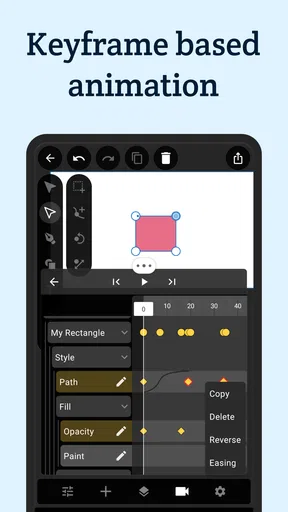
- Intuitive timeline makes keyframe animation easy to manage.
- Supports layered designs for more precise editing control.
- Useful motion presets speed up routine animation tasks.
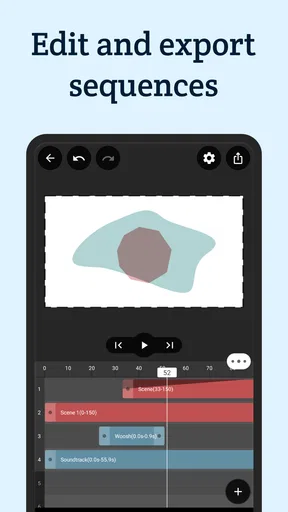
- Exports projects in formats suitable for sharing and publishing.
- Clean interface feels approachable for beginners and casual creators.
Cons
- Advanced tools may feel limited for professional animation workflows.
- Large projects can become difficult to organize on smaller screens.
- Some export options may require a paid upgrade.
- Rendering complex animations can take noticeable time.
- Learning all controls still requires practice despite the simple layout.
FAQs for VectorMotion - Design/Animate
What is VectorMotion - Design/Animate used for?
VectorMotion - Design/Animate is a mobile design and animation tool for creating motion graphics from vector artwork. It can be used to animate logos, illustrations, icons, text, and other graphic elements through a timeline-based workflow. The app is aimed at users who want to produce animated visual content on a phone or tablet without relying entirely on desktop animation software.
Is VectorMotion - Design/Animate suitable for beginners?
The app can be approachable for beginners who already understand basic layers, keyframes, and graphic design concepts, but it is not necessarily an instant one-tap animation tool. New users may need time to learn the interface, timeline controls, object properties, and export settings. Starting with a simple logo or short animation is recommended before attempting complex compositions with multiple animated elements.
What types of projects can be created in VectorMotion - Design/Animate?
VectorMotion - Design/Animate can be used for short animated illustrations, logo reveals, social media graphics, moving titles, icons, presentations, and other motion-design projects. Its vector-focused workflow is particularly useful when you want clean shapes and scalable artwork. The final result depends on the assets you import, the animation techniques you use, and the export options available in your installed version.
Can projects be exported and shared from VectorMotion - Design/Animate?
The app is designed to let users render or export completed animations for sharing, although the exact formats, resolution options, frame rates, and available quality settings may depend on the platform and current app version. Before beginning a large project, check the export menu and confirm whether it supports the format required for your destination, such as social media, messaging, presentations, or further editing.
Does VectorMotion - Design/Animate require a powerful device or an internet connection?
Basic projects should generally be manageable on a reasonably modern Android or iOS device, but complex scenes with many layers, effects, or long timelines can require more memory and processing power. An internet connection may be needed for downloading the app, updates, cloud-related features, or certain purchases, while much of the actual design work may be possible offline. Keep sufficient storage available for project files and exported videos.


